# PORTAL TOOL

This tool lets you add openings on your walls, like doors and windows.
## BASIC BEHAVIOR
### Placing a portal
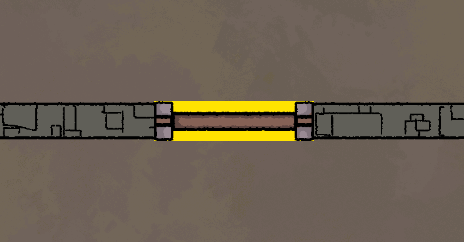
By default, these must be placed **on** [**walls**](https://dungeondraft-encyclopaedia.gitbook.io/guide/all-the-tools/design-tab/wall-tool).
### Rotating a portal
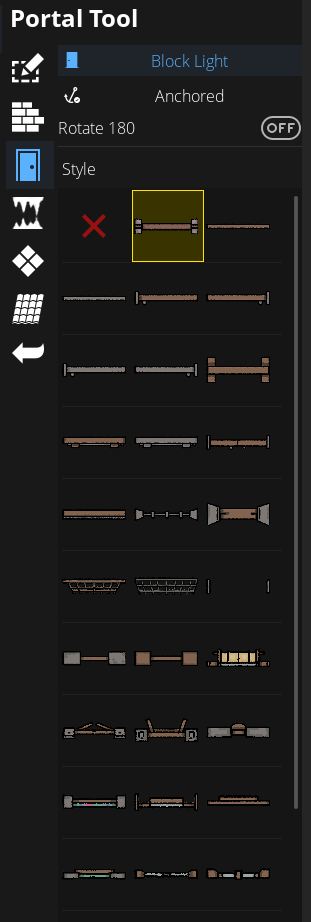
Toggle **Rotate 180** to reverse a portal on a wall.
### Free placement & rotation
To place them freely anywhere, toggle **Anchored** to **Freestanding**.
"Achored" becomes "Freestanding" after clicking on it
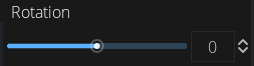
You can then rotate portals with **5° steps** with your MOUSE WHEEL or use the **rotation slider** on the left.
In Freestanding more, you can place and rotate the portals as needed.
{% hint style="info" %}
In Freestanding mode, portals will always go under walls.
{% endhint %}
### Block Light
Toggle **Block Light**/**Allow Light** to set the behavior of the portal regarding lights sources from the [**Light Tool**](https://dungeondraft-encyclopaedia.gitbook.io/guide/all-the-tools/effects-tab/light-tool).
{% hint style="info" %}
Please note that **Block Light** will need the light source to cast [shadows](https://dungeondraft-encyclopaedia.gitbook.io/guide/effects-tab/light-tool#shadows).
{% endhint %}
***
{% hint style="success" %}
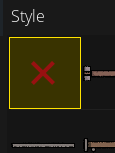
**Pro Tip:** *The first portal in the list (red X) is actually a blank portal. You can use it to simulate a hole.*
{% endhint %}
***
## USEFUL INFO
{% hint style="warning" %}
### 📌 Good to know 📌
* **Freestanding portals** can’t be placed **over walls** or be **resized**. For that, you need to use the [**Objects**](https://dungeondraft-encyclopaedia.gitbook.io/guide/all-the-tools/objects-tab/objects-tool) tool.
* In the [Wall Tool](https://dungeondraft-encyclopaedia.gitbook.io/guide/all-the-tools/design-tab/wall-tool), editing a **Wall** in **Edit Points** mode will remove any **Portal** placed on it.
* Using the [**UVTT**](https://dungeondraft-encyclopaedia.gitbook.io/guide/final-steps/exporting-your-map/universal-vtt) format at **Export** will let you import the file in different VTT programs like Roll20 or FoundryVTT that can read that format. The portals will then be detected and block the players’ movement and sight if your VTT allows it. Depending on the VTT, they can also be opened as real doors, or just allow the sight like a real window. This setting can’t be automated, and will need to be changed manually in the VTT, as there’s no difference between doors and windows (and other types of portals like portcullis).
* The default portals are available as [**Objects**](https://dungeondraft-encyclopaedia.gitbook.io/guide/all-the-tools/objects-tab/objects-tool) since **V1.1.1.1** and many third party asset creators offer that option too with their portals.
{% endhint %}
{% hint style="danger" %}
### KNOWN BUGS
**Version:**\
\&#xNAN;*At least from 1.1.0.6 to 1.2.0.1*
**Bug description:**\
[*Editing Points*](https://dungeondraft-encyclopaedia.gitbook.io/guide/all-the-tools/wall-tool#editing-wall-points) *on a* [*Wall*](https://dungeondraft-encyclopaedia.gitbook.io/guide/all-the-tools/design-tab/wall-tool) *after placing Portals will often result in some weird behavior.*
**Workaround:**\
**-** *If the issue is about portals that can't be placed where they should, saving and reopening the map should fix it.*\
*- If the issue is making walls go crazy, remove the portals and edit points again.*
***
\
**Version:**\
\&#xNAN;*At least from 1.1.0.6 to 1.2.0.1*
**Bug description:**\
\&#xNAN;*Selecting the X portal then changing to another tool can leave the Portal Tool open.*
**Workaround:**\
\&#xNAN;*Go back to the Portal Tool and select any other portal.*
{% endhint %}
***
{% hint style="info" %}
## Related Mods
* [Color and Modify Things](https://dungeondraft-encyclopaedia.gitbook.io/guide/custom-assets-and-mods/some-useful-mods/colour-and-modify-things) adds more options to recolor portals
{% endhint %}
---
# Agent Instructions: Querying This Documentation
If you need additional information that is not directly available in this page, you can query the documentation dynamically by asking a question.
Perform an HTTP GET request on the current page URL with the `ask` query parameter:
```
GET https://dungeondraft-encyclopaedia.gitbook.io/guide/all-the-tools/design-tab/portal-tool.md?ask=
```
The question should be specific, self-contained, and written in natural language.
The response will contain a direct answer to the question and relevant excerpts and sources from the documentation.
Use this mechanism when the answer is not explicitly present in the current page, you need clarification or additional context, or you want to retrieve related documentation sections.